How To Track ChatGPT Traffic
How To Track ChatGPT Traffic
Learn how to track ChatGPT traffic in GA4 and other analytics tools. Measure AI referral traffic and improve your brand's AI visibility
Haritha Kadapa
Highlights
AI Tracking Challenges Redefined: Traditional analytics often miss ChatGPT‑originated visits because LLMs like ChatGPT frequently strip referral data, causing many AI‑driven sessions to appear as direct traffic.
Why ChatGPT Traffic Matters: Tracking and understanding ChatGPT traffic helps brands to identify the content that AI responses reference and how AI-generated discoveries influence conversions and visibility.
GA4 Referral Filtering Essentials: You can capture AI referral visits by filtering for domains like chat.openai.com and chatgpt.com in GA4’s Traffic Acquisition reports to isolate confirmed ChatGPT traffic.
Indirect Signals Are Valuable: Because ChatGPT often omits referral information, using direct traffic spikes, landing page patterns, and manual prompt testing provides additional insight into AI‑driven visits.
No Single Perfect Method Exists Yet: Combining multiple tracking approaches, GA4 referral filtering, UTM parameters for controlled links, and prompt testing, gives a clearer picture of ChatGPT’s impact on site traffic.
For decades, tracking website traffic was relatively simple. Search engines such as Google Search and analytics platforms like Google Analytics passed referral data that showed where visitors came from. Signals such as referral headers, key metrics, backlink data, and campaign parameters (e.g., UTM tags) indicated the cost of each visit.
The rise of AI platforms and large language models (LLMs) has begun to disrupt this model. ChatGPT, developed by OpenAI, is one of the most widely used AI platforms today. Like many AI platforms, ChatGPT does not pass referral data the way traditional search engines do. OpenAI also provides no built-in analytics dashboard showing website owners how much traffic originates from ChatGPT or other OpenAI tools.
As a result, website owners often find it difficult to identify and track visits originating from ChatGPT accurately in a standard analytics tool.
How to track ChatGPT traffic effectively?
Tracking ChatGPT traffic is possible. It requires looking at specific referral strings and direct traffic spikes within your web analytics platform.
This article explains exactly how to track ChatGPT traffic so you can identify these visitors by filtering for specific user agents and referral sources in Google Analytics 4 (GA4). Understanding this is the first step toward mastering Generative Engine Optimization (GEO).
What is AI Traffic Attribution and “Direct” Traffic?
Measuring AI visibility requires understanding how AI-generated responses influence user behavior across the marketing funnel. For a detailed explanation, see our guide on AI Attribution, which explains how AI interactions affect discovery, evaluation, and conversion stages.
Direct Traffic
Direct traffic refers to website visits where an analytics tool cannot identify a referring source. This happens when a user arrives on a site without clicking a trackable link from a search engine, social platform, or another website. The most common example is a user typing your URL directly into their browser.
Direct traffic can also signal strong brand awareness. Returning visitors who already know your website often navigate to it without using a search engine. However, direct traffic is also a catch-all category. It captures any visit where the referral source is missing or unreadable, which can lead to misinterpretations of the data.
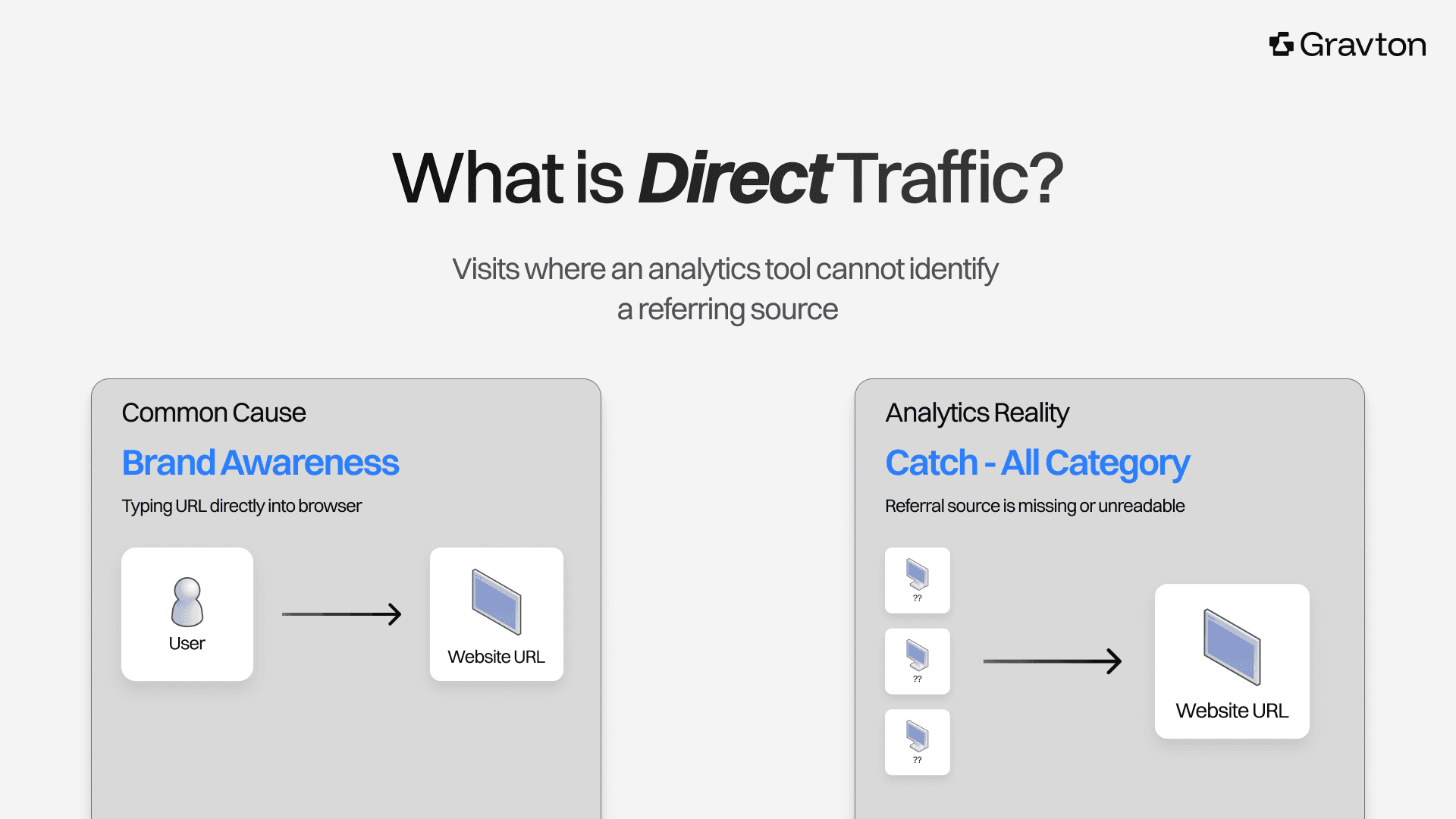
Figure 1: Direct traffic isn't always what it seems: What looks like brand-driven visits in your analytics may actually be from AI platforms.
Why Does ChatGPT Traffic Matter?
AI platforms are changing how users discover information online. Instead of browsing multiple search results, users receive summarized answers directly.
When those responses include links to external sources, they send valuable traffic to the referenced websites. Visits to AI chatbot platforms have been increasing since 2024. For businesses, this creates a new visibility channel. ChatGPT surpassed 100 million weekly active users in its first year and, by early 2026, had reached approximately 900 million globally.
Tracking ChatGPT traffic helps you:
Identify content referenced in AI responses
Measure the impact of AI visibility on website traffic
Understand how AI-driven discovery affects brand awareness
These insights support broader GEO (Generative Engine Optimization) strategies.
But tracking ChatGPT traffic is a difficult task
ChatGPT and most LLMs (Large Language Models) do not pass referrer information to websites. When a user clicks a link inside a ChatGPT response, the referrer header is often blank or stripped entirely. Web analytics tools then log the visit as direct traffic rather than as an AI referral.
This creates a measurable blind spot. A substantial portion of so-called 'direct' traffic may actually originate from AI tools like ChatGPT. For brands optimizing for GEO, this gap makes it difficult to measure results accurately.
Not all AI platforms behave the same way. Perplexity passes referral data more consistently than ChatGPT. ChatGPT's behavior varies depending on whether a user clicks a link from the chat interface or navigates from memory. Understanding these differences is the first step in building an accurate tracking framework.
|
How to Track ChatGPT Traffic in GA4?
One way to identify traffic from ChatGPT is through referral data. When a user clicks a link inside an AI-generated response, the browser may pass a referrer header indicating the visit source. OpenAI uses several user agents, including GPTBot, OAI-SearchBot, and ChatGPT-User, to access, retrieve, or index web content in order to support its AI-powered features.
Here is a practical approach to set up ChatGPT referral traffic tracking in GA4.
Step 1 → Check Your Direct Traffic
In GA4, go to Reports > Acquisition > Traffic Acquisition and filter by the 'Direct' session source. If you notice a sudden increase in direct traffic, especially to content that does not typically receive word-of-mouth visits, it may indicate that AI tools are sending users to your site.
Step 2 → Create a Custom Segment for AI Referrers
In GA4, create a custom exploration report to filter sessions where the session source includes certain domains. This gives you a specific view of confirmed AI-generated referrals. Known referral domains include chat.openai.com, perplexity.ai, and bard.google.com.
In early 2024, OpenAI consolidated much of its traffic under the chatgpt.com domain. Some traffic may still appear under chat.openai.com.
Step 3 → Set Up a Referrer Report
Use GA4's Explore tab to create a custom report. Set 'Session source/medium' as your primary dimension, then filter for the AI referral domains listed above. This report captures traffic from any ChatGPT sessions where referral data is passed.
Step 4 → Monitor Landing Page Patterns
AI tools consistently cite specific pages, often in-depth guides, FAQ pages, or authoritative data-driven content. If a particular page experiences unexplained traffic spikes, check whether your brand or that URL appears in ChatGPT responses by testing it manually.
Step 5 → Add UTM Parameters to Controlled URLs
UTM parameters are tracking codes you append to URLs to identify the source and medium of traffic in your analytics platform. Before publishing, add UTM parameters to URLs you distribute, such as in press releases, syndicated articles, or partnerships.
This approach is effective for content you publish and distribute yourself. It does not capture organic AI mentions where ChatGPT references your page based on its training data or live browsing.
Table 1: UTM parameters for AI-distributed URLs
Parameter | Example value |
utm_source | chatgpt |
utm_medium | ai-referral |
utm_campaign | geo-tracking |
What Additional Tools Help Measure AI-Generated Traffic?
Many digital marketing tools now include features to track AI search visibility and measure AI-generated traffic. Here is a summary of additional options.
Google Search Console
Google Search Console shows queries and pages that earn clicks from Google Search, including insights on Google AI Overviews. If your pages appear in AI-generated answers, Search Console shows impressions and clicks from those placements. Monitor impression trends for content you want AI tools to cite.
Semrush
Semrush has launched a Position Tracking tool to monitor AI Overviews and AI-generated search snippets. This tool assesses whether your pages appear in AI summaries for specific target keywords.
Perplexity Analytics
Perplexity passes more referral data to GA4 than ChatGPT does, which means GA4 can detect perplexity.ai referrals directly. Manually search your brand or topic on Perplexity to determine how often your content is cited and in what context.
Manual Prompt Testing
One of the most direct ways to measure traffic is to test prompts in ChatGPT yourself. Search for queries your customers may ask and note whether your brand or content appears in the responses. This qualitative approach offers insights that automated tools cannot yet provide at scale.
What Are the Limitations of Tracking ChatGPT Traffic?
Tracking traffic from ChatGPT has certain limitations you should account for. Not all AI-generated answers include external links, and AI platforms frequently change how they display or share links. Referral data may not always be captured by analytics platforms.
Key challenges include:
AI tools may strip referrer information.
Users may not always click on the links provided.
Web analytics cannot always distinguish AI visits from other sources.
Because of these limitations, measuring AI traffic often relies on indirect signals. By combining multiple metrics, you can build a more accurate picture of how AI visibility affects website performance.
How to Track ChatGPT Traffic: Key Takeaways
Learning how to track ChatGPT traffic is essential for any modern marketing strategy. It requires a combination of referral filtering in GA4, manual prompt testing, and downstream signals like branded search volume. Because AI platforms do not consistently pass referrer data, no single perfect measurement method exists yet. By combining the approaches in this guide, you can build a meaningful picture of how AI-generated traffic is affecting your website.
As AI search tools like ChatGPT, Perplexity, and Google AI Overviews grow in usage, the brands that measure and optimize for AI visibility now will hold a meaningful advantage.
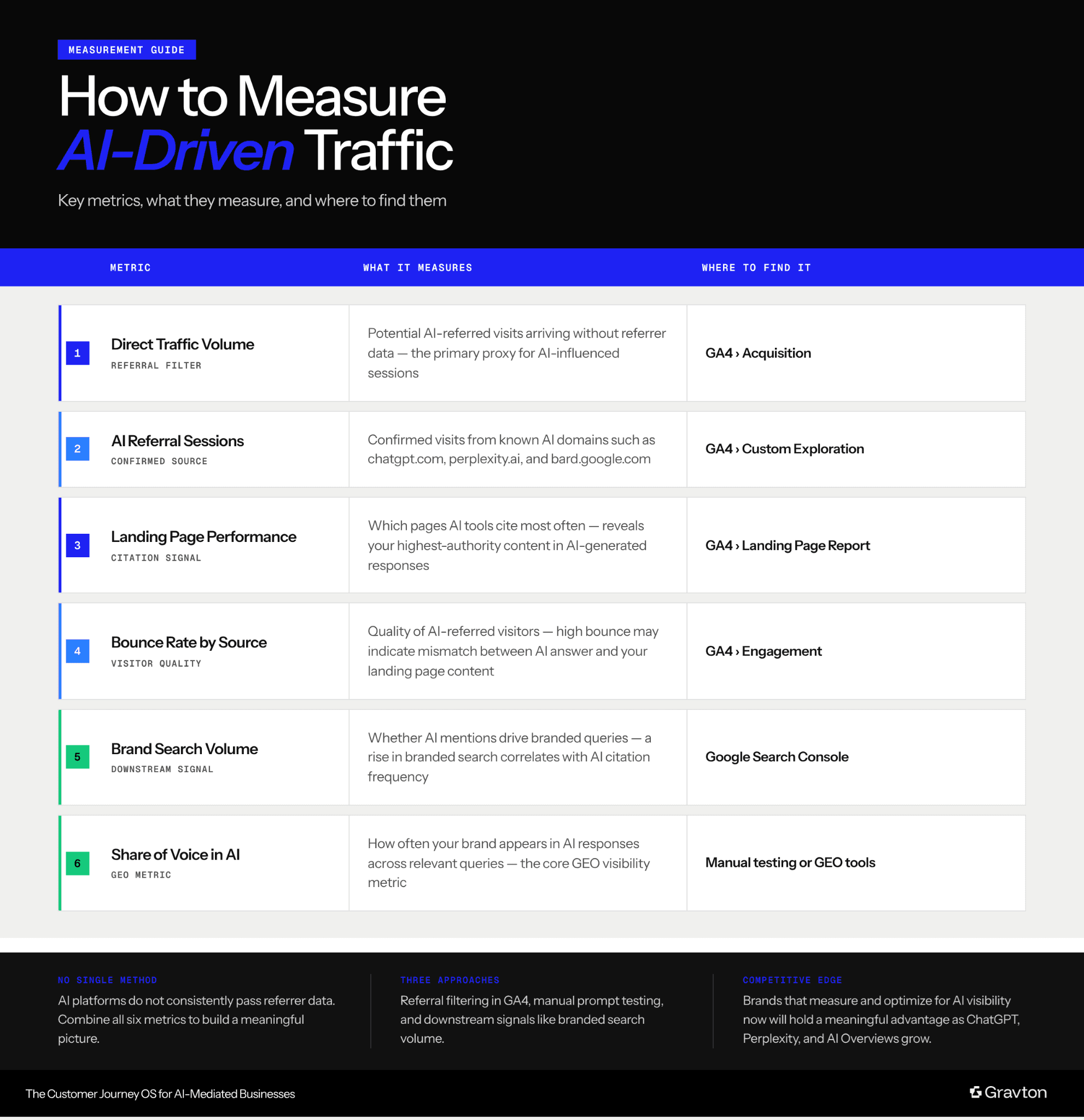
Figure 2: How to measure AI-driven traffic: Key metrics, what they measure, and where to find them.
Frequently Asked Questions: Answers on Tracking ChatGPT Traffic
What Is ChatGPT Traffic?
ChatGPT traffic refers to website visits generated when a user clicks links recommended within ChatGPT conversations. It falls under the broader category of AI-generated traffic, which includes visits from Perplexity, Google AI Overviews, and other AI platforms.
What Is 'Direct' Traffic?
Direct traffic refers to website visits where an analytics tool cannot identify a referring source. It occurs when a user arrives on a site without clicking a trackable link from a search engine, social platform, or another website.
Why Does ChatGPT Traffic Show Up as Direct in GA4?
ChatGPT strips referrer data from most outbound links. GA4 cannot identify the visit source and defaults to logging these sessions as direct traffic.
How Do I Find ChatGPT Referral Traffic in GA4?
In GA4, go to Reports > Acquisition > Traffic Acquisition and filter by session source. Look for chat.openai.com or chatgpt.com as a referral domain.
Can UTM Parameters Track ChatGPT Clicks?
UTM parameters track clicks on ChatGPT only if you control the placement of your URL. For example, in your own cited content such as a press release or syndicated article.
Free AI Visibility Audit
Limited Availability.
VISIBILITY & CONTENT STRATEGY